TL;DR
Owners are the revenue side, so the site is built around them: a rental analysis offer on every owner page, fees in plain view, and answers to the management agreement questions owners ask. Tenants get their own path to listings, the application, the portal and maintenance requests. City pages and your Google Business Profile bring in owners searching "property management" plus a city.
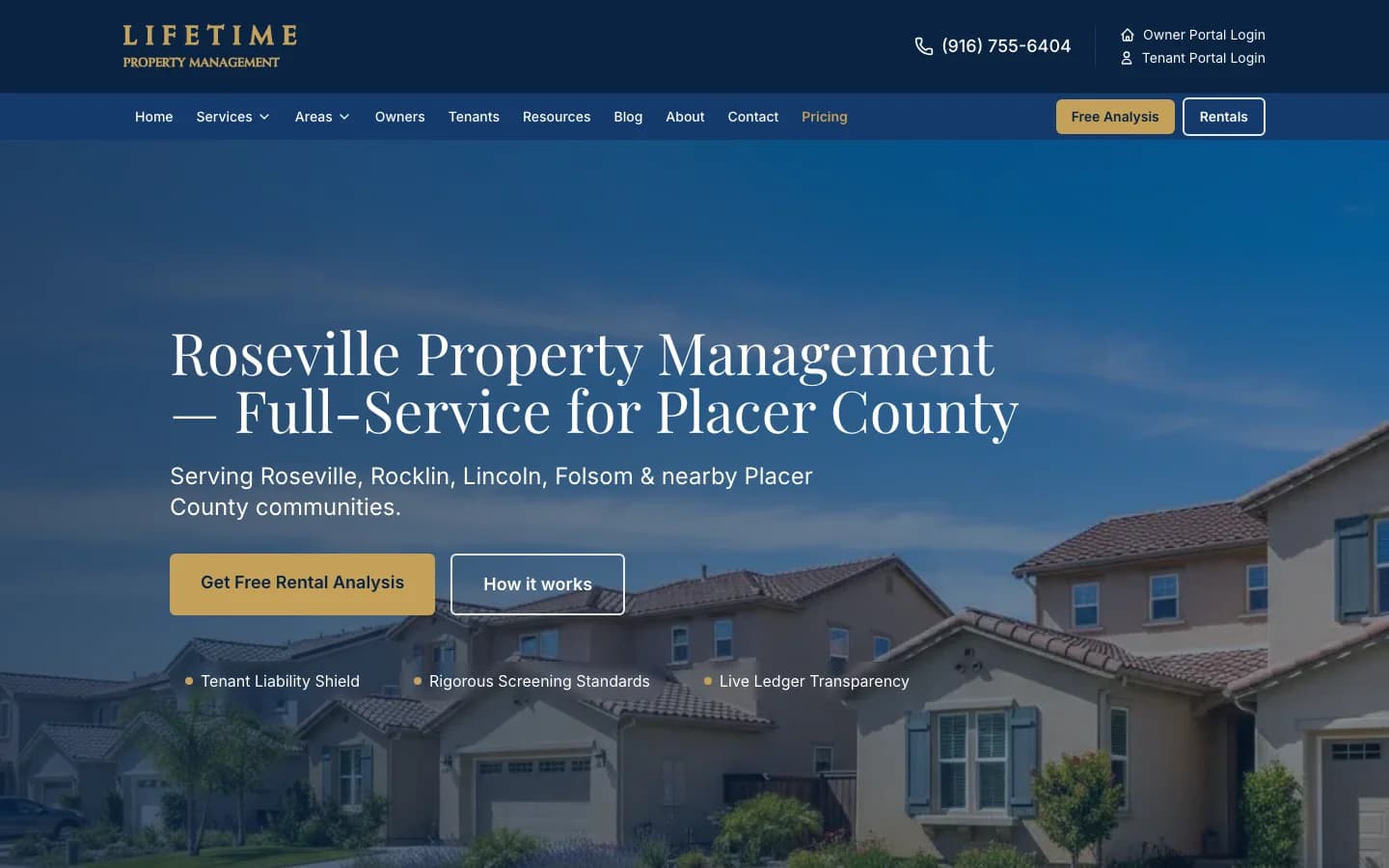
This guide comes from both sides of the work. Verlua's founder is a Sacramento real estate broker who manages 50+ rental doors, and we built the Lifetime Property Management website in Roseville. Every example below is on that live site, checked on October 31, 2026. If you'd rather see what we build than read about it, go straight to our property management website design page.
What Does a Property Management Website Need?
A property management website needs nine things: an owner offer, published fees, an agreement FAQ, city pages, property-type pages, a page for owners switching managers, listings with an application, a tenant portal with maintenance requests, and an owner portal login. The first six win new doors. The last three keep current tenants and owners off your phone.
| Element | For | What it does | Example on lifetimepm.com |
|---|---|---|---|
| Free rental analysis offer | Owners | Gives an owner a reason to contact you today | /owners/rental-analysis, plus a Free Analysis button in the header |
| Published fees | Owners | Answers the first money question before the call | /pricing, linked from the main menu |
| Management agreement FAQ | Owners | Covers term, fees and leaving before they become objections | Pricing questions answered on /pricing |
| City pages | Owners | Ranks for “property management [city]” searches | /areas/roseville, /areas/rocklin, /areas/folsom |
| Property-type pages | Owners | Speaks to duplex and small-apartment owners directly | /areas/roseville/duplexes |
| Switching managers page | Owners with a manager | Answers how a change of manager works | /services/switching-property-managers |
| Available rentals and application | Applicants | Keeps applicants on your site and in your process | /tenants/available-rentals, /tenants/apply |
| Tenant portal and maintenance request | Current tenants | Sends routine requests away from your phone | /tenants/portal, /tenants/maintenance-request |
| Owner portal login | Current owners | One click to statements, in the header | /owners/portal |
Paths checked on the live site on October 31, 2026.
Notice the split in that list. A common mistake is treating the website as a brochure for owners with a rent payment link bolted on. The better structure gives each audience its own menu item, its own pages and its own next step. The sections below cover the owner side first, because that is where new revenue comes from.
How Do You Get Owner Leads From a Property Management Website?
Give owners an offer worth filling out, then answer every question that would stop them. In practice that is a free rental analysis, published fees, a management agreement FAQ and reviews from other owners. Each one removes a reason to keep shopping, so the owner who lands on your city page contacts you instead of the next manager in the results.
Lead with a free rental analysis
"Contact us" asks an owner to start a sales conversation. "Find out what your home should rent for" offers them something they want anyway. Put the rental analysis button in the header and on every owner page, and give it its own page that explains what the owner gets back and how fast. Lifetime's main hero button is "Get Free Rental Analysis" for this reason.
Keep the form short: name, phone, email, the property address and a few optional details. Useful ones are the property type, whether it is vacant, occupied or self-managed today, and when the owner wants a manager. Every extra required field costs you some owners, so ask the rest on the phone. Send each request to your inbox or CRM the moment it arrives. An owner who filled out several managers' forms is still comparing, and a fast, useful reply is your first chance to stand out.
Publish your fees
Owners ask about fees early, and a manager who hides them invites the assumption that they are high. A pricing page should show the monthly management fee, the leasing or placement fee, what each covers, and what you don't charge for. Lifetime's pricing page lists both fees, what the monthly fee covers, and that there are no setup or cancellation fees and no management fee while a home is vacant.
If your fees vary by property, publish a starting point and say what moves it. A range with a reason reads as honest. "Call for pricing" reads as a sales tactic, and owners comparing three managers will call the two that answered the question first.
Answer the management agreement questions
Owners hesitate over the contract more than the fee. Answer these on the site, in plain English, and link the answers from every owner page:
- How long is the agreement, and how do I end it? State the term and the notice needed.
- What does it cost to place a tenant? The leasing or placement fee, and what it includes.
- Who approves repairs? The dollar amount you can approve without asking, and how emergencies work.
- When and how do I get paid? The payout date and what the monthly statement shows.
- What happens if I switch to you from another manager? Lifetime answers this one on its own page.
Your answers depend on your agreement and on local rules, so write them with whoever drafted your contract. The website's job is to make the answers easy to find, not to replace the agreement.
Show reviews from owners
Owners reading your site want to hear from other owners. Ask for a Google review after a successful lease-up or a year-end statement, and show real owner reviews, with permission, on the owner pages. Never write or edit reviews yourself; quote them as given.
Want a site that brings in owners?
We build property management websites with a rental analysis offer, a fee page, city pages and separate tenant paths. A one-time build is $2,500 – $5,000.
Should Owner and Tenant Paths Be Separate?
Yes. Owners and tenants arrive with different jobs, and one shared menu serves neither well. Put "Owners" and "Tenants" in the main menu, and both portal logins in the header, so each visitor is one click from what they came for. Tenant requests then go to the portal, and owner leads stop getting lost among them.
| Compare | Owner path | Tenant path |
|---|---|---|
| They want to | Decide who to trust with a rental | Find a home, apply, pay rent, report a repair |
| Main button | Free rental analysis | See available rentals |
| Key pages | Services, pricing, agreement FAQ, city and property-type pages | Listings, application, portal, maintenance request |
| Login | Owner portal | Tenant portal |
| What success looks like | A rental analysis request or a call | A completed application or a portal request instead of a phone call |
The portal itself lives in your property management software. Whether you use Rentvine, AppFolio, Buildium or another platform, the website links to its tenant portal, application and maintenance form rather than rebuilding them. Rent payments and lease records stay where they belong. The one thing worth keeping on your own site is the listings page: when vacancies only appear on third-party rental sites, applicants never see your brand, and prospective owners never see how you market a home.
How Do Property Managers Rank for "Property Management [City]"?
With a page for each city you actually manage in, a complete Google Business Profile, and reviews. Google says local results are based mainly on relevance, distance and popularity. You can't change distance, so the work goes into relevance (pages and profile details that say exactly what you manage and where) and popularity (reviews, links and mentions).
That wording comes from Google Business Profile Help. A good city page covers the neighborhoods and property types you take on there, the rent context an owner cares about, and owner reviews from that area. Lifetime goes one step further in its core cities with property-type pages, such as duplexes in Roseville, which speak to an owner who searches for exactly that.
One warning. Dozens of pages that only swap the city name are what Google's spam policies call doorway abuse. Build pages only for cities where you have doors, and give each one something specific. Our local SEO guide for service businesses covers the Business Profile side in more depth.
How Do You Show Up in AI Answers for Property Management?
Make your pages easy for AI tools to read and quote. Owners can now ask ChatGPT, Perplexity or Google's AI features to suggest a property manager, and those tools can only use what they can read. Put fees, service areas and agreement answers in plain page text, open each page with a direct answer, and add FAQ and business schema.
- Text, not PDFs or images. A fee schedule inside a PDF or a graphic is easy for a person to miss and harder for a crawler to use.
- Answer first. Start each owner page with one or two sentences that answer the question it targets, then expand.
- Consistent facts. The same business name, address, phone and service area on the site, the Business Profile and directories.
- Crawler access. Let AI crawlers fetch the site in robots.txt, and describe the business in an llms.txt file.
No one can guarantee a business gets named in an AI answer, and we won't promise it. For the full checklist, see how to get cited in ChatGPT, Perplexity and Gemini.
What Does a Property Management Website Cost?
At Verlua, a property management website is a one-time build of $2,500 – $5,000, depending on how many city and property-type pages you need, the portal and listings links, and timeline. If you also want help ranking those city pages, ongoing SEO runs $2,500/mo during launch months, then $1,500/mo. No minimum contract.
| Option | Price | What it covers |
|---|---|---|
| Website build | $2,500 – $5,000 one-time | Owner and tenant paths, rental analysis page, fee page, agreement FAQ, city pages, portal and listings links |
| SEO launch months | $2,500/mo | Business Profile cleanup, more city and property-type pages, tracking setup |
| Ongoing SEO | $1,500/mo | New pages, review requests, local listings and a monthly report |
Exact pricing depends on scope, competition, and timeline. These figures reflect what we typically quote for local service businesses; every engagement is confirmed after a free audit or discovery call.
For how those prices compare with freelancers and DIY builders, read what a website costs in Sacramento. To see what search growth looks like on sites we built, our Google search results page lists clicks before and after with exact dates; Sacramento Gutter Guard, for example, went from 60 to 776 Google clicks over the same 12 weeks a year apart (case study). Those are search clicks, not leads. When you're ready to scope a site, start with our websites for property management companies or our general web design services.
Frequently Asked Questions About Property Management Websites
What should be on a property management website?
A free rental analysis offer for owners, published fees, a short management agreement FAQ, a page for each city you manage in, and separate owner and tenant paths. Tenants need available rentals, the application, the rent payment portal and a maintenance request one click from the header. Owners need the owner portal login and a reason to call.
What is a rental analysis on a property management website?
It is a free estimate of what an owner’s home should rent for, usually paired with what management would cost. It is the main owner-lead offer on a property management website, because it gives an owner who is still deciding something useful in exchange for an address and a phone number.
Should a property management company list its fees online?
We recommend it. Fees are one of the first things an owner asks a manager about. A pricing page that shows the monthly fee, the leasing or placement fee, and what you don’t charge for answers that question before the call, so the owners who do call are further along.
Do property management companies need a page for each city?
Yes, for each city you actually manage in. Owners search by city, and a page that covers the neighborhoods and property types you take on there gives Google a reason to show you. Skip near-identical pages that only swap the city name; Google’s spam policies treat those as doorway abuse.
Can a property management website connect to Rentvine, AppFolio or Buildium?
Yes, by linking to them. The website sends tenants to the portal, application and maintenance request in the software you already use, and owners to their owner portal. Rent payments, leases and statements stay in that software, so the website never has to store them.
How much does a property management website cost?
At Verlua, a one-time website build is $2,500 – $5,000, depending on pages, integrations and timeline. Ongoing SEO, if you want help ranking city pages, runs $2,500/mo during launch months, then $1,500/mo. No minimum contract. Exact scope is confirmed after a free discovery call.
Ready for more owner leads?
We build property management websites for the Sacramento region: Sacramento, Roseville, Rocklin and Folsom. A one-time build is $2,500 – $5,000. No minimum contract on SEO.
Founder & Technical Director
Mark Shvaya runs Verlua, a web design and development studio in Sacramento. He is also a Sacramento real estate broker who manages 50+ rental doors, so he builds property management websites from the operator’s side.
California real estate broker, property manager, and founder of Verlua.
Stay Updated
Get the latest insights on web development, AI, and digital strategy delivered to your inbox.
No spam, unsubscribe anytime. We respect your privacy.
Related Articles
How Much Does a Website Cost in Sacramento? (2026)
Verlua’s real prices, what moves the price, DIY vs freelancer vs agency, monthly vs one-time billing, and timelines.
Read More about How Much Does a Website Cost in Sacramento? (2026)Local SEO in 2026: Guide for Service Businesses
Google Business Profile, local rankings and city pages for service businesses that want more leads from local search.
Read More about Local SEO in 2026: Guide for Service BusinessesGet Cited in AI Search: ChatGPT, Perplexity, Gemini
Schema, entity signals and answer formatting that help a local business get cited in AI answers.
Read More about Get Cited in AI Search: ChatGPT, Perplexity, Gemini